.%20TODO(brand):%20replace%20with%20the%20master%20vector%20from%20the%20brand%20files.%20--%3e%3cdefs%3e%3clinearGradient%20id='rudratic-mark'%20x1='0'%20y1='195'%20x2='0'%20y2='828'%20gradientUnits='userSpaceOnUse'%3e%3cstop%20offset='0'%20stop-color='%235a0bd8'%20/%3e%3cstop%20offset='1'%20stop-color='%23a5157c'%20/%3e%3c/linearGradient%3e%3c/defs%3e%3cg%20fill='url(%23rudratic-mark)'%3e%3cpath%20d='M253%20448%20545%20195l60%2070-292%20252z'%20/%3e%3cpath%20d='M348%20558%20473%20450v200L348%20768z'%20/%3e%3cpath%20d='M523%20405%20640%20305l83%2097-141%20120%20153%20128-102%2087-110-97z'%20/%3e%3cpath%20d='m663%20763%2072-61v126z'%20/%3e%3c/g%3e%3c/svg%3e)
- RM-STL-012TMT Bar 12mm Fe500D18 of 30 tLow stock
- EL-PLC-001Siemens PLC3 of 5 unitsLow stock
- VL-GTV-004Gate Valve 4" CI6 of 20 pcsLow stock
- PF-FLG-316SS 316 Flange 4"38 of 60 pcsLow stock
- PF-ELB-0451/2" PPH 45 Elbow620 of 1000 pcsLow stock
- EL-PNL-010Siemens PLC panel parts4 of 6 lotsLow stock
Out to site
- No challans yet today
SyncVentoryInventory and site logistics

SyncVentory: Every material, from request to site, on the record
Inventory, procurement and site logistics for project businesses: material requests with approvals, purchase orders, goods receipts and delivery challans, with the value of what reached each site, every day.
Follow the material
One trail from the site’s request to the site’s delivery
Each stage is a record with an owner, so the stock figure, the project’s spend and the audit trail move together.
- MR
Material request
Site engineer
Raised for an assigned project, then tracked through submitted, under review, approved and fulfilled.
- OK
Approval
Project manager, finance
Requests over ₹1,00,000 need both the project manager and finance to sign. Anything waiting over 24 hours escalates on its own.
- PO
Purchase order
Procurement
Supplier details on the order, and invoices attached and checked with AI (OCR parsing).
- GRN
Goods receipt
Storekeeper
Arrivals booked into the warehouse, with physical stock counts and adjustments.
- DC
Delivery challan
Storekeeper
Issuing a challan deducts stock in one atomic step, logs the outbound movement and adds to the project’s spend.
- SITE
On site
Project
The day’s material value for the project number appears in Site Material Values.
Site material values
What reached each site, and what it was worth, day by day
Type a project number and SyncVentory totals the value sent to date, the delivery days and the challans, plots the daily spend and lets you open any day down to the items, rates, vehicles and who received them. One click exports it as CSV.
Bank valuation
Stock valued the way your bank will value it
For credit lines and banking facilities, set the bank’s valuation haircut and SyncVentory recomputes book against bank value for every item, ready to export or print as an appraisal.
- Book value
- ₹30,03,600
- Bank value
- ₹24,02,880
| Item | Qty | Book unit | Bank unit | Bank value |
|---|---|---|---|---|
| TMT Bar 12mm Fe500D | 18 t | ₹1,10,000 | ₹88,000 | ₹15,84,000 |
| Siemens PLC | 3 units | ₹1,85,000 | ₹1,48,000 | ₹4,44,000 |
| Gate Valve 4" CI | 46 pcs | ₹4,500 | ₹3,600 | ₹1,65,600 |
| SS 316 Flange 4" | 38 pcs | ₹4,600 | ₹3,680 | ₹1,39,840 |
| 1/2" PPH 45 Elbow | 620 pcs | ₹140 | ₹112 | ₹69,440 |
Sample stock
See it running
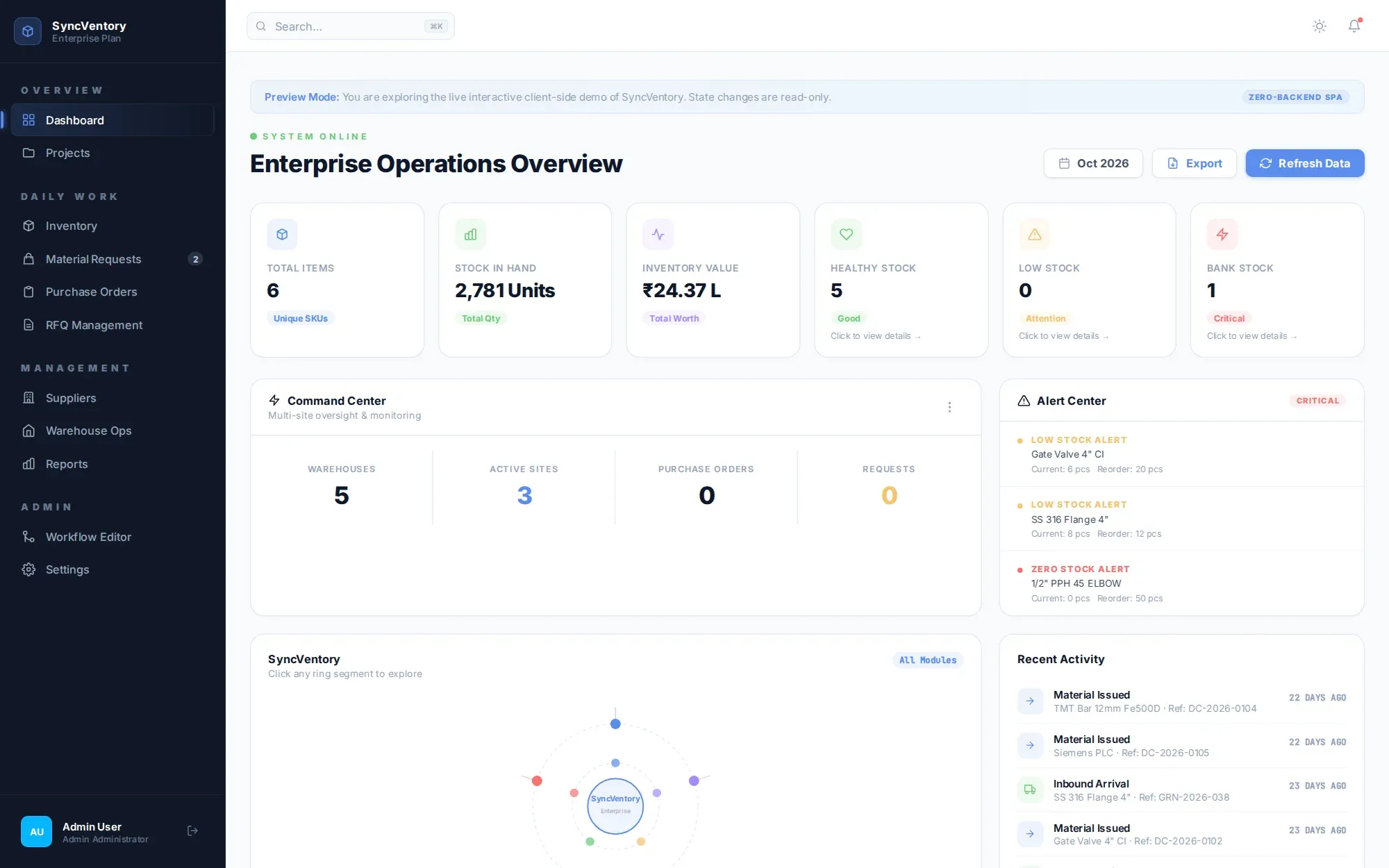
The operations overview, from the live demo
Stock in hand, inventory value, healthy, low and bank stock, warehouses and active sites, alerts and the latest challans, on one screen.
Roles and control
Everyone sees their part of the job
- BAY 01
Administrator
System settings, users, custom approval workflows and direct stock overrides.
- BAY 02
Project manager
Assigned project codes, budgets, material request approvals and site dispatches.
- BAY 03
Storekeeper
Delivery challans, goods receipt notes and physical stock count adjustments.
- BAY 04
Site engineer
Read-only site access, and material requests for assigned projects.
- Reorder pointsMinimum stock and reorder points per SKU, with low and zero stock alerts.
- Multi-code projectsA project can carry several tender or sub-contract codes, each with its own quantity and budget.
- Audit logEvery approval, movement and stock override is logged.
Deployment
Runs in your cloud or on your own servers
A three-tier application on PostgreSQL 16 with a REST API and high-availability app nodes, deployed with Docker Compose or Kubernetes.
- Small1 – 50 users · Up to 10,000 SKUs2 vCPU · 4 GB
- Medium, HA50 – 500 users · Up to 100,000 SKUs4 vCPU · 16 GB · HA replica
- Enterprise cluster500+ users · Unlimited SKUs8+ vCPU · 32 GB · PgBouncer
SyncVentory, answered
Q-001What is SyncVentory?
SyncVentory is inventory and site logistics software for project-based businesses. It runs material requests, approvals, purchase orders, goods receipts and delivery challans in one system, and shows the value of materials sent to each site, every day.
Q-002How is each day’s material value worked out?
SyncVentory adds up every delivery challan for that project and date, multiplying quantity by unit cost for each line item, to give the day’s total value and quantity. If a line has no unit cost, it uses the item’s baseline cost from the catalogue.
Q-003How do approvals work?
Approval workflows are set per project. Requests over ₹1,00,000 need both the project manager and finance to sign, and requests waiting more than 24 hours escalate automatically.
Q-004Can one project carry several tender codes?
Yes. A project can hold several tender or sub-contract codes, each with its own quantity and budget allocation.
Q-005Can it value stock for a bank facility?
Yes. Bank Values applies the bank’s valuation haircut to every item, shows book against bank unit cost, and exports or prints the appraisal.
Q-006Where does it run?
On Docker Compose or Kubernetes with PostgreSQL 16, in your cloud or on-premises. A small setup for up to 50 users needs 2 vCPU and 4 GB; an enterprise cluster for 500+ users runs on 8+ vCPU and 32 GB with managed PostgreSQL and PgBouncer.
Track your next delivery in SyncVentory
Explore the interactive demo, or book a walk-through with your projects and approval rules.