.%20TODO(brand):%20replace%20with%20the%20master%20vector%20from%20the%20brand%20files.%20--%3e%3cdefs%3e%3clinearGradient%20id='rudratic-mark'%20x1='0'%20y1='195'%20x2='0'%20y2='828'%20gradientUnits='userSpaceOnUse'%3e%3cstop%20offset='0'%20stop-color='%235a0bd8'%20/%3e%3cstop%20offset='1'%20stop-color='%23a5157c'%20/%3e%3c/linearGradient%3e%3c/defs%3e%3cg%20fill='url(%23rudratic-mark)'%3e%3cpath%20d='M253%20448%20545%20195l60%2070-292%20252z'%20/%3e%3cpath%20d='M348%20558%20473%20450v200L348%20768z'%20/%3e%3cpath%20d='M523%20405%20640%20305l83%2097-141%20120%20153%20128-102%2087-110-97z'%20/%3e%3cpath%20d='m663%20763%2072-61v126z'%20/%3e%3c/g%3e%3c/svg%3e)
What is privileged access management? A practical guide
What is privileged access management? Learn the account types, core PAM controls, how PAM differs from IAM and IGA, and a checklist to get started.
Key takeaways
- Privileged access management (PAM) controls, monitors and audits the accounts that can change systems, security settings or sensitive data.
- PAM covers four kinds of privileged identity: human administrators, service accounts, machine identities and cloud roles or keys.
- The core PAM capabilities are discovery, credential vaulting and rotation, just-in-time access, session management and recording, least privilege and audit.
- IAM decides who someone is and what they may use; IGA governs who should have which entitlements; PAM controls how powerful access is granted and used.
- A PAM programme starts with an inventory of privileged accounts and a pilot on one high-value system, not with a vault for a few admin passwords.
Privileged access management (PAM) is how an organisation controls the accounts that can change its systems: administrator, root, database owner, service and cloud owner accounts. So what is privileged access management in practice? It decides who may hold elevated access, grants it for an approved purpose and time, keeps the credentials out of people’s hands, records what happens in the session and leaves evidence an auditor can check. This guide is for security leaders, engineers and buyers who need a vendor-neutral definition, a map of the capabilities, and a checklist for starting or reviewing a PAM programme.
Privileged access management (PAM) is the set of policies, processes and tools that control, monitor and audit accounts with elevated rights, so that powerful access is granted only when needed, used through a controlled session and recorded for review.
NIST defines a privileged user as one “authorized (and therefore, trusted) to perform security-relevant functions” that ordinary users may not, and a privileged account as “a system account with the authorizations of a privileged user.” PAM is the discipline built around those accounts. For a short definition you can link to, see the PAM glossary entry.
What is privileged access management for?
A normal account can read a document. A privileged account can change access rules, install software, export a database, turn off logging or create new administrators. Whoever controls that account, whether its owner, an attacker with a stolen password or a script with a hard-coded key, controls the systems behind it.
Most organisations collect privileged access faster than they remove it. Admin rights granted for a project stay after it ends, shared passwords are known by people who changed teams years ago, and cloud keys outlive the job that created them. PAM makes that access deliberate: every elevated action can be tied to a named person, an approval and a time window.
PAM does not replace endpoint security, patching, backups or secure development. It is one control layer, focused on the identities with the largest blast radius.
Which types of privileged accounts does PAM protect?
An inventory limited to a directory’s “Domain Admins” group misses most privileged access. Privilege also comes from local groups, sudo rules, database roles, cloud policies and API keys. The table below groups the main types.
| Account type | Examples | Typical risk | PAM control |
|---|---|---|---|
| Human administrator | Domain admin, Linux root or sudo user, DBA, firewall admin | Phished or reused passwords; standing rights | Separate admin identity, MFA, just-in-time grants, session recording |
| Service account | Application database login, scheduled job, integration user | Broad rights, password never changes, no named owner | Named owner, vaulted credential, scheduled rotation |
| Machine identity | CI/CD pipeline token, SSH key, API key, certificate | Secrets copied into code and config files | Short-lived credentials, secret injection at run time |
| Cloud role or key | AWS IAM role, Azure Owner assignment, GCP service account key | Long-lived keys; roles that outlive the task | Time-bound roles brokered into short-lived credentials |
| Third-party and emergency | Vendor support login, break-glass admin | Access never removed; emergency use unreviewed | Named vendor accounts, time windows, dual control for break-glass |
Non-human accounts are often the hardest to own, because nobody signs in as them. The non-human identity glossary entry explains why they need the same governance as administrators.
What are the core capabilities of PAM?
Products differ, but a complete PAM programme covers six capabilities. Treat them as a lifecycle: each one depends on the one before it.
Discovery
You cannot control accounts you have not found. Discovery inventories local administrators, sudo members, directory groups (including nested groups), database roles, cloud roles and the hosts they can reach. In the SWOT platform, SWOT Radar records the local admins, sudo and wheel members and SSH users on each host and follows nested AD groups.
Credential vaulting and rotation
A vault stores passwords, SSH keys, cloud keys and API tokens encrypted, releases them through a recorded checkout, and changes them after use or on a schedule so a copied secret stops working. Better still, a proxy injects the credential into the session so the person never sees it. See credential vaulting for the term.
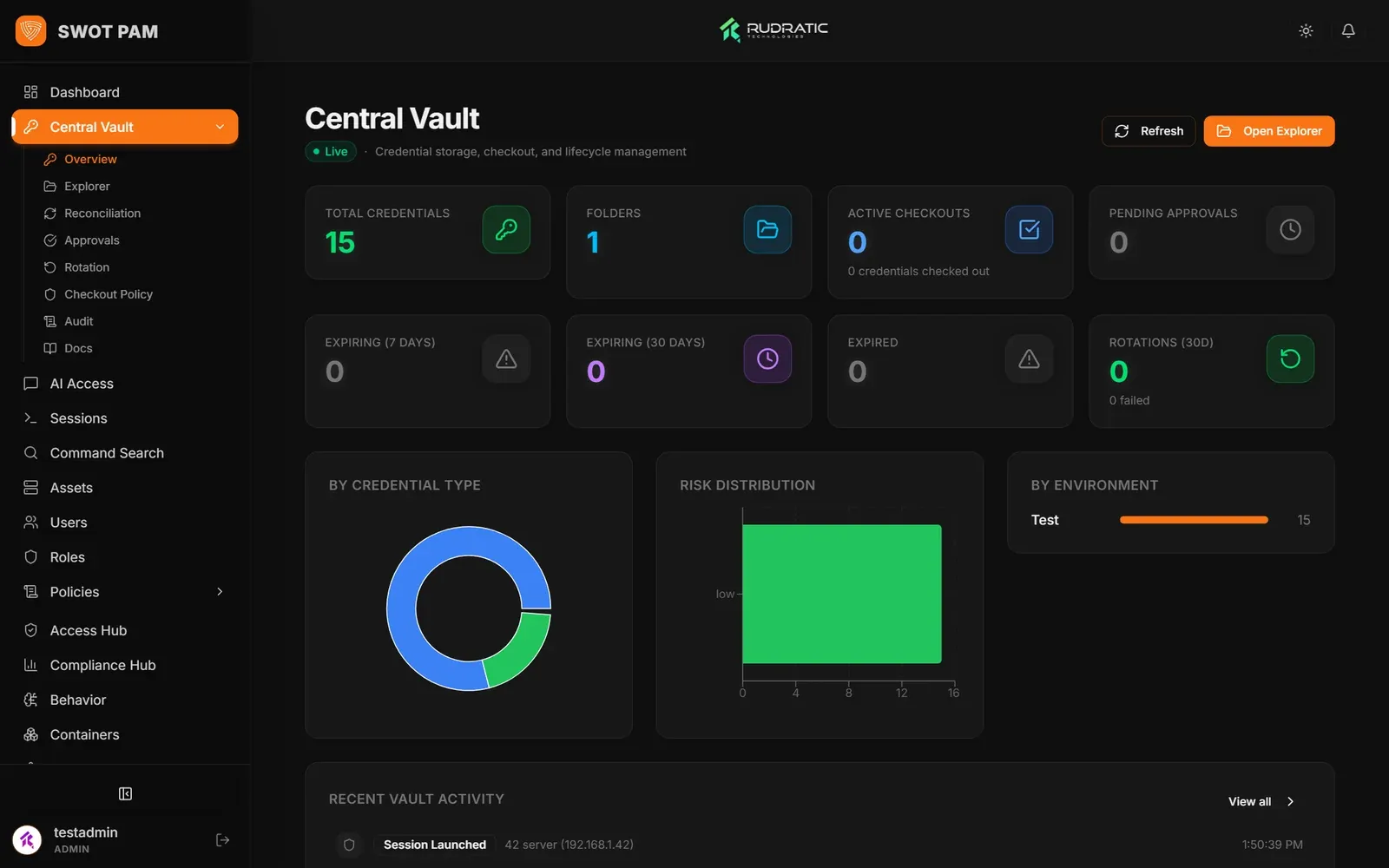 SWOT PAM: the credential vault.
Just-in-time access
Just-in-time access grants elevation only when a task needs it, for a set time, after an approval, and removes it automatically when the window closes. Taken to its end point this becomes zero standing privileges: no account holds admin rights by default.
Session management and recording
Privileged sessions run through a proxy or gateway that checks policy, injects credentials and captures what happens: commands, queries, screens or API calls. Some tools can also block a dangerous command or end a session while it is live. Session recording turns that capture into replayable evidence.
Least privilege
NIST describes least privilege as restricting access “to the minimum necessary to accomplish assigned tasks.” In PAM terms that means narrow roles, read-only access by default, and separate approval for anything that changes production. The least privilege glossary entry covers how it relates to JIT.
Audit and reporting
Every request, approval, checkout, session and policy change should land on a record that cannot be quietly edited. Auditors care less about whether a tool exists than whether you can show who had access, who approved it, when it ended and what was done. The access control (AC) and audit and accountability (AU) families in NIST SP 800-53 Rev. 5 are a common reference for what that evidence should cover.
How is PAM different from IAM and IGA?
The three overlap and share data, but they answer different questions. Most organisations need all three, connected: the identity provider authenticates, IGA decides entitlements, and PAM governs the high-risk use of them.
| IAM (identity and access management) | IGA (identity governance and administration) | PAM (privileged access management) | |
|---|---|---|---|
| Main question | Who is this, and what may they sign in to? | Should this person hold this entitlement? | How is powerful access granted, used and recorded? |
| Scope | All users and applications | All entitlements, joiner-mover-leaver | Admin, root, service, machine and cloud owner access |
| Typical controls | SSO, MFA, federation, directory | Access requests, certification campaigns, role models | Vaulting, rotation, JIT grants, session proxy, recording |
| Time scale | Each sign-in | Quarterly or periodic reviews | Each privileged session, minutes to hours |
Zero trust is an architecture rather than a product category. NIST SP 800-207 states that zero trust “assumes there is no implicit trust granted to assets or user accounts.” PAM applies that idea to the most powerful accounts. The zero trust and identity security entries explain the wider terms.
What PAM deployment models are there?
PAM tools are delivered in three main ways, and the choice affects where credentials and recordings live.
- Self-hosted: the platform runs in your data centre or your own cloud account. Credentials, recordings and audit data stay in infrastructure you control, which matters for regulated data and air-gapped sites.
- SaaS: the vendor runs the control plane. Setup is faster, but check where the vault, session recordings and keys are stored, and how sessions reach targets inside your network.
- Hybrid: a cloud control plane with on-premises connectors or gateways, or a self-hosted platform managing cloud targets.
As an example of self-hosting, SWOT PAM runs as seven containers on Docker Compose or Kubernetes, in the cloud, on-premises or hybrid, with an offline bundle for air-gapped sites. It brokers SSH, RDP and database sessions through a proxy with no agent on the target servers. SWOT Cloud PAM is also self-hosted and governs the AWS, Azure and GCP management plane, brokering short-lived STS or OAuth credentials at a gateway.
How do you choose a PAM solution?
Write requirements around your own estate rather than a generic feature list, and test them in a proof of concept on real systems. These questions separate products quickly.
- Which targets does it cover natively: Linux, Windows, which databases, which clouds, network devices, SaaS consoles?
- Does the user ever receive the target credential, or is it injected by a proxy?
- Can policy express target, role, duration, reason, approver and separation of duties, and does access end on its own?
- What is installed where: agents on targets, a gateway, a browser extension, a client?
- What does a session record contain, can it be searched, and how does an auditor know it has not been altered?
- Can it stop a dangerous command while the session is live, or only record it?
- Which identity providers, SIEMs and chat or ticketing tools does it connect to?
- What happens to access when the PAM platform, the identity provider or the network is down, and how is break-glass handled?
Test usability as a security requirement. A request flow that takes too long pushes engineers back to shared passwords and permanent exceptions.
PAM implementation checklist
Use this as a starting plan. It assumes one accountable owner in security or IT and input from the teams that do the administrative work.
- Write a policy: what counts as privileged, who approves, maximum grant length, break-glass rules, recording and retention.
- Inventory privileged accounts across directories, local groups, sudo rules, databases, cloud roles, keys and vendor access, with an owner for each.
- Rank systems by impact and pick a pilot that includes one high-value target and a real admin workflow.
- Connect the identity provider with MFA, plus the approval channel your teams already use.
- Move shared and service credentials into the vault; find hard-coded uses before you rotate them.
- Replace standing admin rights on the pilot systems with time-bound, approved grants.
- Route privileged sessions through the proxy or gateway and turn on recording.
- Set up a break-glass path, test it, and alert on every use.
- Send PAM events to your SIEM and review exceptions on a fixed schedule.
- Measure: standing admin accounts removed, grants issued, average approval time, exceptions. Expand system by system.
Next steps
In short, the answer to what is privileged access management is a programme that controls the accounts able to do the most damage: find them, vault their credentials, grant access just in time, record the sessions and keep evidence that cannot be quietly changed. Start with an inventory and a pilot, then remove standing access system by system. See how SWOT PAM handles each step, or book a demo on your own servers and databases.
Questions
What does PAM stand for in security?
PAM stands for privileged access management. It is the set of policies, processes and tools that control accounts able to make high-impact changes, such as administrator, root, database owner and cloud owner accounts. In identity contexts PAM is not the Linux pluggable authentication modules framework, which shares the same abbreviation.
Does PAM replace multi-factor authentication?
No. Multi-factor authentication proves that a person is who they claim to be. PAM decides what that verified person may do with privileged access, for how long, and with what record. Most PAM deployments require MFA at sign-in and add approvals, time limits, brokered credentials and session recording on top of it.
How long does a PAM implementation take?
There is no reliable universal timeline. It depends on how many privileged accounts you have, how well they are documented, how many target platforms and integrations are in scope, and how much hard-coded credential use must be migrated. A pilot on one high-value system shows the real effort before you commit to a wider rollout.
Should service accounts be in scope for PAM?
Yes. Service accounts often hold broad rights and run continuously, and their passwords or keys rarely change. Bring them into scope with a named owner, a documented purpose, vaulted credentials and a rotation method that does not break the job using them. Short-lived workload credentials are better where the platform supports them.
Sources
Products in this post


Keep reading
See it on your own systems
A walk-through of the products with the team that builds them.